For anyone interested in seeing why I didn't pursue a career in web design, head on over to here:
www.stormyprods.com
It's pretending to be the web site for my new software development company. I have no artistic talent, so right now it's very monochromatic, barebones, and the logo art (not that I'd really call it art) is very rough.
I'm going to now refrain from any more postings on this blog regarding iPhones or software development. All that sort of content will now be posted on the company web site.
Friday, August 29, 2008
iPhone Notes Font Change


If you don't have an iPhone, you can stop reading.
I just accidentally discovered a way to disable the default "handwritten" style font (officially called Marker Felt) used in the iPhone Notes app. This can be done on a note-by-note basis. Here's a screen shot illustrating the differences between the two fonts:

It's quite simple to get this behavior. First (and you only need to do this once) go into your main iPhone settings and enable an international keyboard. You can do it via the Keyboard settings (as shown below) or via the International settings. Choose to add a new keyboard, specifically one with Japanese support.

Then, when you are editing a note, press the world icon next to the space bar:

This will toggle your keyboard mode amongst the keyboard settings you chose earlier. When you get to the Japanese keyboard (as can be seen by the funky space bar) simply press any character on the keyboard and your current note will instantly revert to a normal non-handwritten font. And, as an added benefit, you can type Japanese characters.

Even if you delete the international characters from the note, it will remain in this font. I'm assuming the iPhone must be saving either font or character set information on each individual note. Too bad there's no way to select a specific font to make each note stand out from others on the main list.
I just accidentally discovered a way to disable the default "handwritten" style font (officially called Marker Felt) used in the iPhone Notes app. This can be done on a note-by-note basis. Here's a screen shot illustrating the differences between the two fonts:

It's quite simple to get this behavior. First (and you only need to do this once) go into your main iPhone settings and enable an international keyboard. You can do it via the Keyboard settings (as shown below) or via the International settings. Choose to add a new keyboard, specifically one with Japanese support.

Then, when you are editing a note, press the world icon next to the space bar:

This will toggle your keyboard mode amongst the keyboard settings you chose earlier. When you get to the Japanese keyboard (as can be seen by the funky space bar) simply press any character on the keyboard and your current note will instantly revert to a normal non-handwritten font. And, as an added benefit, you can type Japanese characters.

Even if you delete the international characters from the note, it will remain in this font. I'm assuming the iPhone must be saving either font or character set information on each individual note. Too bad there's no way to select a specific font to make each note stand out from others on the main list.
Thursday, August 28, 2008
Office mishap
I had a mishap with my new office. As can be seen in my previous picture of the home office - it's actually just my dining room table with a couple of laptops (and a sewing machine) on it. Well, since it does double as my dining room table, I tend to eat there while working in front of the computers.
This morning I was eating a bowl of cereal and I noticed a small drop of milk splashed onto the laptop. So, as I continued eat the cereal with one hand, I reached up with my other hand to wipe the milk of the laptop. Unfortunately for me, the bowl of milk was balanced on top of a paper notebook I had been using for taking notes and the edge of the notebook was overhanging the edge of the table slightly. So, as I reached up with my other hand, I clipped the edge of the notebook and dumped most of the bowl of cereal (milk and all!) on to my laptop computer. Whoops! I just had to laugh out loud at my total clumsiness. In an attempt to clean up a couple drops of milk, I ended up completely soaking my computer in milk.
Fortunately, my computer appears to like milk. It's still running just fine. Though, I do hope it doesn't start to smell.
Sorry, I didn't take a picture. It was tempting to take one, but I figured my time was better spent mopping up the milk before it soaked into the computer too much.
This morning I was eating a bowl of cereal and I noticed a small drop of milk splashed onto the laptop. So, as I continued eat the cereal with one hand, I reached up with my other hand to wipe the milk of the laptop. Unfortunately for me, the bowl of milk was balanced on top of a paper notebook I had been using for taking notes and the edge of the notebook was overhanging the edge of the table slightly. So, as I reached up with my other hand, I clipped the edge of the notebook and dumped most of the bowl of cereal (milk and all!) on to my laptop computer. Whoops! I just had to laugh out loud at my total clumsiness. In an attempt to clean up a couple drops of milk, I ended up completely soaking my computer in milk.
Fortunately, my computer appears to like milk. It's still running just fine. Though, I do hope it doesn't start to smell.
Sorry, I didn't take a picture. It was tempting to take one, but I figured my time was better spent mopping up the milk before it soaked into the computer too much.
Monday, August 25, 2008
New Office

With a new job comes a new office. It's a bit of a mess. My boss is a bit of a slob. I don't know why he insists on keeping a sewing machine on my desk.
This is my first day of self-employment. So far it doesn't really seem like work. It's more like what I would normally enjoy doing in my free time on the computer anyhow. Hopefully I'll figure out a way to actually earn an income with it at some point. But for now it'll be a lot of research and learning.
I'm hoping to target my applications to the iPhone and Mac, so I have to get up to speed first with Apple's Cocoa programming environment. I'm already an official Apple-registered iPhone developer (along with about a bazillion other software developers chasing the iPhone application development goldrush), but I've been doing low-level embedded programming for the past 8 years, so it'll probably take me a month or so to get proficient with Apple's tools. Maybe in two months (hopefully less) I'll have something professional-looking for the iTunes store.
Monday, August 18, 2008
Automating Photo uploads in Blogger
This post is going to be somewhat technical. (Mom, you can stop reading right now - you're not missing anything.) I'm going to describe how to automate the uploading of photos to Blogger such that it is fairly easy to then compose a blog entry referencing those photos. This process assumes you have a Mac (since it uses AppleScript) and an FTP account on a server where you will be hosting your images. It also assumes you have the program Graphic Converter and the Cyber Duck FTP client.
First, some background.
I recently discovered that when I use the normal Blogger interface for uploading photos, Blogger is doing some sort of color conversion with the images. What I see after I upload an image is not the same as what I originally sent. Since most of the images I upload to this blog are photos, having the color changed on me - even slightly - is somewhat of a problem. I'm not claiming to have any artistic vision, but I would like what I try to display be displayed in the most accurate manner possible.
So, to get around this problem, I decided to resort to hosting my photos on my own FTP server. The problem with this is I can no longer use the convenient feature in Blogger for inserting an image in my post. I now have to do my own conversion of the photos, making a separate thumbnail image along with the larger sized image, upload those images to the FTP server and then remember the path for the images so when I craft the custom HTML code to insert the images in my blog post, the path correctly references the thumbnail and links to the larger image. Then, if I am including several photos in my blog post, I have to repeat this process for each photo! Ug! That would take forever! And I'm a slow enough writer as it is.
Fortunately, computers don't mind doing repetitive tasks such as what I just described and in fact they can do it quickly and error free. All I needed to do was write a small script to perform the proper actions. Here's a link to the sample script. It takes a list of photos, generates thumbnails of them, uploads both the thumbnails and original images to my FTP server, and then inserts into my clipboard the HTML text necessary to reference these images in my blog posting. Oh, and then the script deletes the original photos and thumbnails from my computer. That's an important point to know, especially if you are planning on using this script. THE SCRIPT IF USED AS IS WILL DELETE YOUR ORIGINAL PHOTOS! For me this is what I want since the originals are just low-res exports from my photo management system.
I should also note that the script I am using is based on a script written by Jerry Stratton. His excellent detailed description of using AppleScript with GraphicConverter can be found here. When I first needed to perform this scripting task I had no experience with AppleScript and Jerry's example was just what I needed. If you aren't too familiar with AppleScript, I'd recommend first checking out Jerry's site. He provides much more detail in the description of his script and how it works.
Here's the normal workflow for me using this script. I am using Adobe Lightroom for managing my photos. When I have a set of photos I'd like to upload to my blog, I choose to export them. I export them in a lower resolution for the web - usually with a max width or height of 600 pixels. Since these low-res photos will be deleted once I'm done, I export them to a scratch directory called blog-drop.
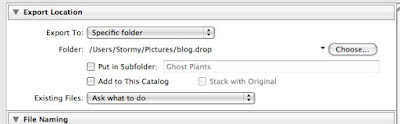
At the very bottom of the export dialog window there is an option to perform Post-processing" on the exported images. This is where you will choose to run the AppleScript to create thumbnails and upload the images to the FTP server.

Once you export the photos, your mouse cursor will turn into a black and white spinning wheel while the AppleScript runs. After it is complete, you can then go to the Blogger post editor and simply hit the paste key and the HTML code for referencing the just uploaded photos will automatically appear.

And that's about it as far as using the script. Don't forget, as written, the script WILL DELETE YOUR PHOTOS!!! If you don't want that to happen, look for the following lines in the script:
If you don't want the files to be deleted after they are FTP'd to the server, change the last argument of 1 to a 0.
One other note - the call to open an FTP connection looks like this:
You may notice that there is no password listed in this. I am using the feature of CyberDuck that allows saving the FTP password to the Mac keychain. This is much more secure than hardcoding the password into the script. If someone looks at your script, they won't know what the FTP password is. Of course, it could be argued that the use of FTP itself is not secure and I'd agree. Using plain FTP your username and password are sent over the Internet as clear text. If you are concerned about such things, then use SFTP instead (assuming your FTP server supports it).
First, some background.
I recently discovered that when I use the normal Blogger interface for uploading photos, Blogger is doing some sort of color conversion with the images. What I see after I upload an image is not the same as what I originally sent. Since most of the images I upload to this blog are photos, having the color changed on me - even slightly - is somewhat of a problem. I'm not claiming to have any artistic vision, but I would like what I try to display be displayed in the most accurate manner possible.
So, to get around this problem, I decided to resort to hosting my photos on my own FTP server. The problem with this is I can no longer use the convenient feature in Blogger for inserting an image in my post. I now have to do my own conversion of the photos, making a separate thumbnail image along with the larger sized image, upload those images to the FTP server and then remember the path for the images so when I craft the custom HTML code to insert the images in my blog post, the path correctly references the thumbnail and links to the larger image. Then, if I am including several photos in my blog post, I have to repeat this process for each photo! Ug! That would take forever! And I'm a slow enough writer as it is.
Fortunately, computers don't mind doing repetitive tasks such as what I just described and in fact they can do it quickly and error free. All I needed to do was write a small script to perform the proper actions. Here's a link to the sample script. It takes a list of photos, generates thumbnails of them, uploads both the thumbnails and original images to my FTP server, and then inserts into my clipboard the HTML text necessary to reference these images in my blog posting. Oh, and then the script deletes the original photos and thumbnails from my computer. That's an important point to know, especially if you are planning on using this script. THE SCRIPT IF USED AS IS WILL DELETE YOUR ORIGINAL PHOTOS! For me this is what I want since the originals are just low-res exports from my photo management system.
I should also note that the script I am using is based on a script written by Jerry Stratton. His excellent detailed description of using AppleScript with GraphicConverter can be found here. When I first needed to perform this scripting task I had no experience with AppleScript and Jerry's example was just what I needed. If you aren't too familiar with AppleScript, I'd recommend first checking out Jerry's site. He provides much more detail in the description of his script and how it works.
Here's the normal workflow for me using this script. I am using Adobe Lightroom for managing my photos. When I have a set of photos I'd like to upload to my blog, I choose to export them. I export them in a lower resolution for the web - usually with a max width or height of 600 pixels. Since these low-res photos will be deleted once I'm done, I export them to a scratch directory called blog-drop.

At the very bottom of the export dialog window there is an option to perform Post-processing" on the exported images. This is where you will choose to run the AppleScript to create thumbnails and upload the images to the FTP server.

Once you export the photos, your mouse cursor will turn into a black and white spinning wheel while the AppleScript runs. After it is complete, you can then go to the Blogger post editor and simply hit the paste key and the HTML code for referencing the just uploaded photos will automatically appear.

And that's about it as far as using the script. Don't forget, as written, the script WILL DELETE YOUR PHOTOS!!! If you don't want that to happen, look for the following lines in the script:
 -- Send all the processed files and then delete them
 ftpSend(thumbNails, destinationThumbFolder, 1)
 ftpSend(sourceFiles, destinationImageFolder, 1)
If you don't want the files to be deleted after they are FTP'd to the server, change the last argument of 1 to a 0.
One other note - the call to open an FTP connection looks like this:
connect to hostName as user userName with protocol ftpProtocol with initial folder dest
You may notice that there is no password listed in this. I am using the feature of CyberDuck that allows saving the FTP password to the Mac keychain. This is much more secure than hardcoding the password into the script. If someone looks at your script, they won't know what the FTP password is. Of course, it could be argued that the use of FTP itself is not secure and I'd agree. Using plain FTP your username and password are sent over the Internet as clear text. If you are concerned about such things, then use SFTP instead (assuming your FTP server supports it).
Poor product design
When I bought my condo it came with a new washer and dryer. The dryer has a very annoying "feature." When the drying cycle is complete, the dryer sounds an alarm. Then, every 5 minutes after that, it sounds the alarm again and the dryer startups up and tumbles for about 30 seconds. This process repeats until I either turn off the dryer or open the dryer door. The reasoning, I suppose, is it is trying to prevent the clothes from becoming wrinkled. But come on! To do this forever is just ridiculous.
This feature - which can't be turned off - means if I put clothes in the dryer and then leave my condo, my neighbors will get to listen to the dryer alarm every five minutes until I get home and turn it off. Or, if I want to run the dryer just before going to sleep, the alarm ensures I'll wake up in the middle of the night to empty the clothes, otherwise I'll get to listen to some loud beeping every five minutes throughout the night.
Is it really that important to have unwrinkled clothes? I think a much better feature would be to have such an alarm on the washing machine. I can easily forget I put a load of clothes in the washer and then discover it a day later. Wet clothes in a washer sitting for a day is never a good thing. The mildew smell is usually so bad I have to re-wash the clothes. Nothing bad like that would happen if I left clothes in the dryer for a day, yet the designer of these machines felt the dryer needs a constant alarm, yet the washer gets none.
This feature - which can't be turned off - means if I put clothes in the dryer and then leave my condo, my neighbors will get to listen to the dryer alarm every five minutes until I get home and turn it off. Or, if I want to run the dryer just before going to sleep, the alarm ensures I'll wake up in the middle of the night to empty the clothes, otherwise I'll get to listen to some loud beeping every five minutes throughout the night.
Is it really that important to have unwrinkled clothes? I think a much better feature would be to have such an alarm on the washing machine. I can easily forget I put a load of clothes in the washer and then discover it a day later. Wet clothes in a washer sitting for a day is never a good thing. The mildew smell is usually so bad I have to re-wash the clothes. Nothing bad like that would happen if I left clothes in the dryer for a day, yet the designer of these machines felt the dryer needs a constant alarm, yet the washer gets none.
Sunday, August 17, 2008
Attack of the Nematodes
While overwatering my bonsai plant, I made an odd discovery. It appeared a worm had washed out of the bottom of the pot. Here's a picture of it. It's the pale worm-like looking thing in the water.

To get a sense of scale in these pictures, the dark blue tray with the water in it is about 5 inches across. The leaves floating in the water are tiny - only 1/4 of an inch in length. So, this worm is pretty small - probably less than an inch in length.
While looking at the worm a little closer, I noticed it had little tendrils coming off it in places and the tendrils were moving! I thought that was a bit odd.

Upon further inspection, I discovered those tendrils weren't tendrils at all, but were tiny worm-like critters (maybe a couple mm in length) that were swimming around! Ick! I'm really at a loss to explain what they are. After researching it a bit, I'm guessing these are some type of nematode. Most nematodes are microscopic, but some are bigger.
In these last two pictures, I highlighted the critters so they are easier to spot.

In this picture, some of them look a bit flatter - at least in the picture. When I was watching them with my naked eye they always appeared tube-shaped to me. Perhaps it's distortion from the water or they really are flatter than I thought. If that's the case, maybe they're planarians. I dunno.

I was surprised by how strong they were. One was flipping around on the edge of the water and was actually moving one of the leaves that was floating in the water. Pretty strong for something only a few millimeters long!
There's a whole ecosystem living in my bonsai plant of which I wasn't even aware.

To get a sense of scale in these pictures, the dark blue tray with the water in it is about 5 inches across. The leaves floating in the water are tiny - only 1/4 of an inch in length. So, this worm is pretty small - probably less than an inch in length.
While looking at the worm a little closer, I noticed it had little tendrils coming off it in places and the tendrils were moving! I thought that was a bit odd.

Upon further inspection, I discovered those tendrils weren't tendrils at all, but were tiny worm-like critters (maybe a couple mm in length) that were swimming around! Ick! I'm really at a loss to explain what they are. After researching it a bit, I'm guessing these are some type of nematode. Most nematodes are microscopic, but some are bigger.
In these last two pictures, I highlighted the critters so they are easier to spot.

In this picture, some of them look a bit flatter - at least in the picture. When I was watching them with my naked eye they always appeared tube-shaped to me. Perhaps it's distortion from the water or they really are flatter than I thought. If that's the case, maybe they're planarians. I dunno.

I was surprised by how strong they were. One was flipping around on the edge of the water and was actually moving one of the leaves that was floating in the water. Pretty strong for something only a few millimeters long!
There's a whole ecosystem living in my bonsai plant of which I wasn't even aware.
Unexpected Blogger photo conversion
There appears to be something odd going on with photos when uploaded via the Blogger interface. Normally, Blogger automatically resizes the photo, but as far as I knew, it didn't alter anything else about the photo. Today I discovered something odd is occurring with the color of the photos. I have no idea if it's a new development or whether I just happened to notice it now.
Here's an example. This first photo is what my original photo looked like. The second photo is how it appears if I use Blogger's photo upload feature.


Feel free to click on the photos to see even large versions. The color changes are much more obvious with the full-sized version. Notice the coloring of the second photo is washed out. It's somewhat subtle, but it bugs me enough that I'm now going to start resizing photos myself so I know exactly what will appear on this blog.
Here's an example. This first photo is what my original photo looked like. The second photo is how it appears if I use Blogger's photo upload feature.


Feel free to click on the photos to see even large versions. The color changes are much more obvious with the full-sized version. Notice the coloring of the second photo is washed out. It's somewhat subtle, but it bugs me enough that I'm now going to start resizing photos myself so I know exactly what will appear on this blog.
Random Eye Dull Photo - Lady Bug
There were no blackberries on this blackberry bush, but there was a lady bug.
Ghost Plants
I have no idea what these plants are, but they reminded me of ghosts. They're kind of translucent and lack any sort of color. Perhaps they're mushrooms?

A friend pointed them out to me while we were hunting for blackberries in the Douglas State Forest.
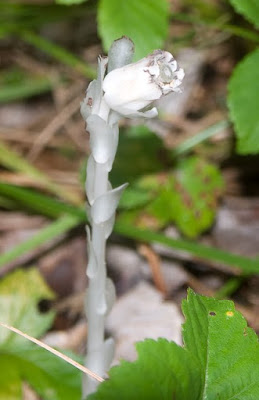
From this last close-up, it does appear the plant has a tiny bit of color. There's a bit of yellow inside the "flower" shaped part of the plant.
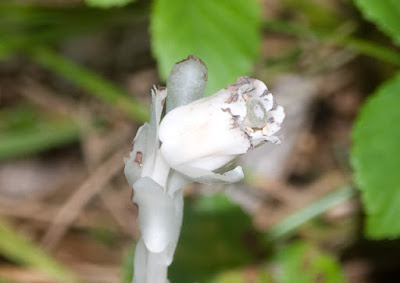
UPDATE: I wasn't too far off calling it a ghost plant. That's actually one of the names it goes by. It's officially called Monotropa Uniflora, also known as Indian Pipes or Ghost Plant. If you follow the previous link (click on the Latin name), you can read a bit more about the plant. The interesting thing is the plant has no chlorophyll, so it has to get its energy by being a parasite of sorts (like a mushroom).

A friend pointed them out to me while we were hunting for blackberries in the Douglas State Forest.

From this last close-up, it does appear the plant has a tiny bit of color. There's a bit of yellow inside the "flower" shaped part of the plant.

UPDATE: I wasn't too far off calling it a ghost plant. That's actually one of the names it goes by. It's officially called Monotropa Uniflora, also known as Indian Pipes or Ghost Plant. If you follow the previous link (click on the Latin name), you can read a bit more about the plant. The interesting thing is the plant has no chlorophyll, so it has to get its energy by being a parasite of sorts (like a mushroom).
Subscribe to:
Posts (Atom)